๐ŸŽ‰ Use code  FIRSTTRY  and get 2 days FREE โ€” No card needed! ๐ŸŽ‰
  100% Undetectable  ยท  AI-Powered

Crack Any Interview.
Stay Invisible.

An invisible browser that gives you real-time access to Google, ChatGPT, Gemini, and any AI โ€” while you're live on Zoom, Teams, or Google Meet. Your interviewer sees nothing.

Black window after screen share? Switch to Version 2.0
Undetectable on
Zoom Zoom
Teams Microsoft Teams
Google Meet Google Meet
Leetcode Leetcode

You See Everything. They See Nothing.

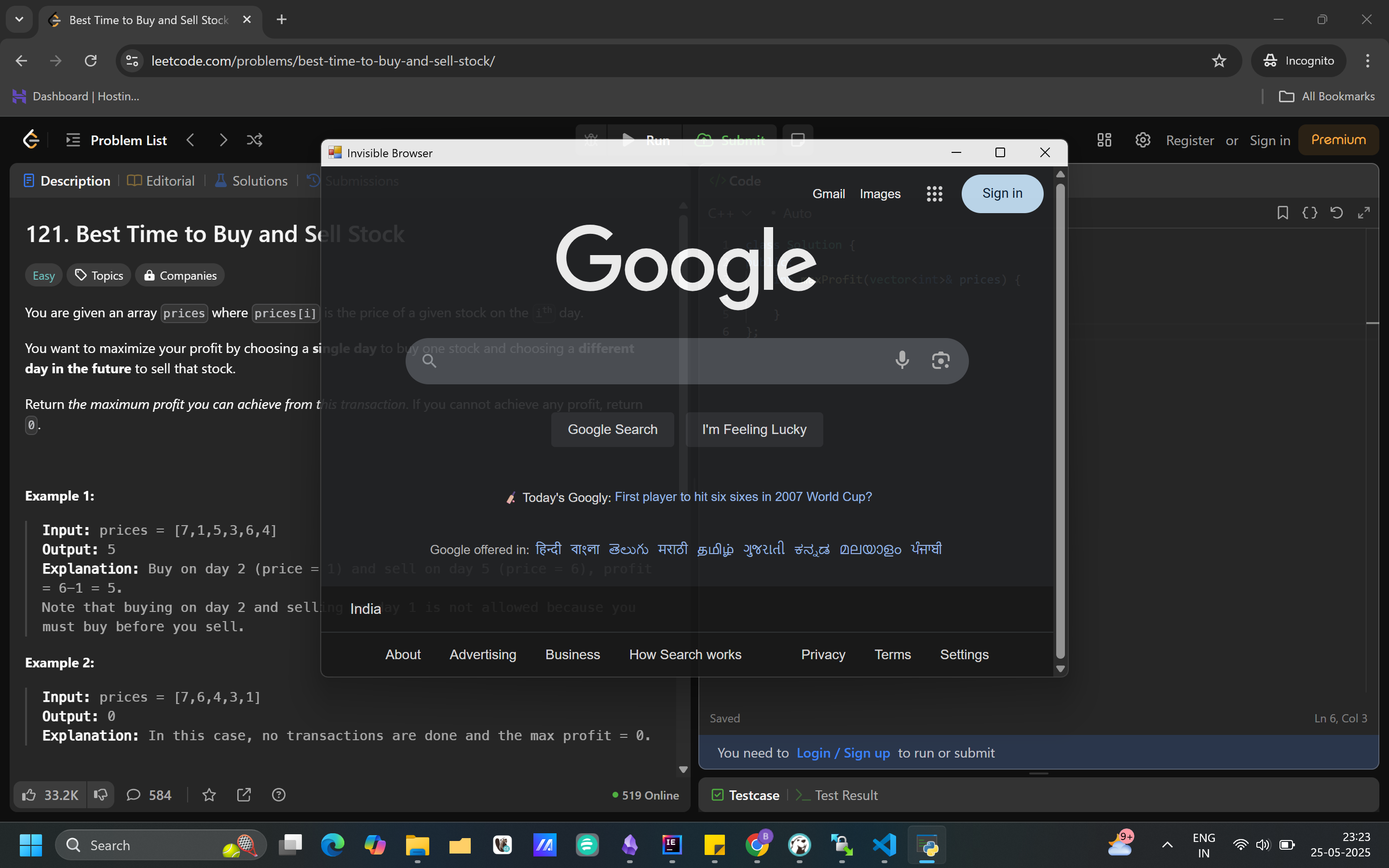
Browse AI tools and Google freely โ€” your screen stays clean for the interviewer.

What You See
Your Screen

Full browser with Google, ChatGPT, Gemini โ€” anything you need, right there

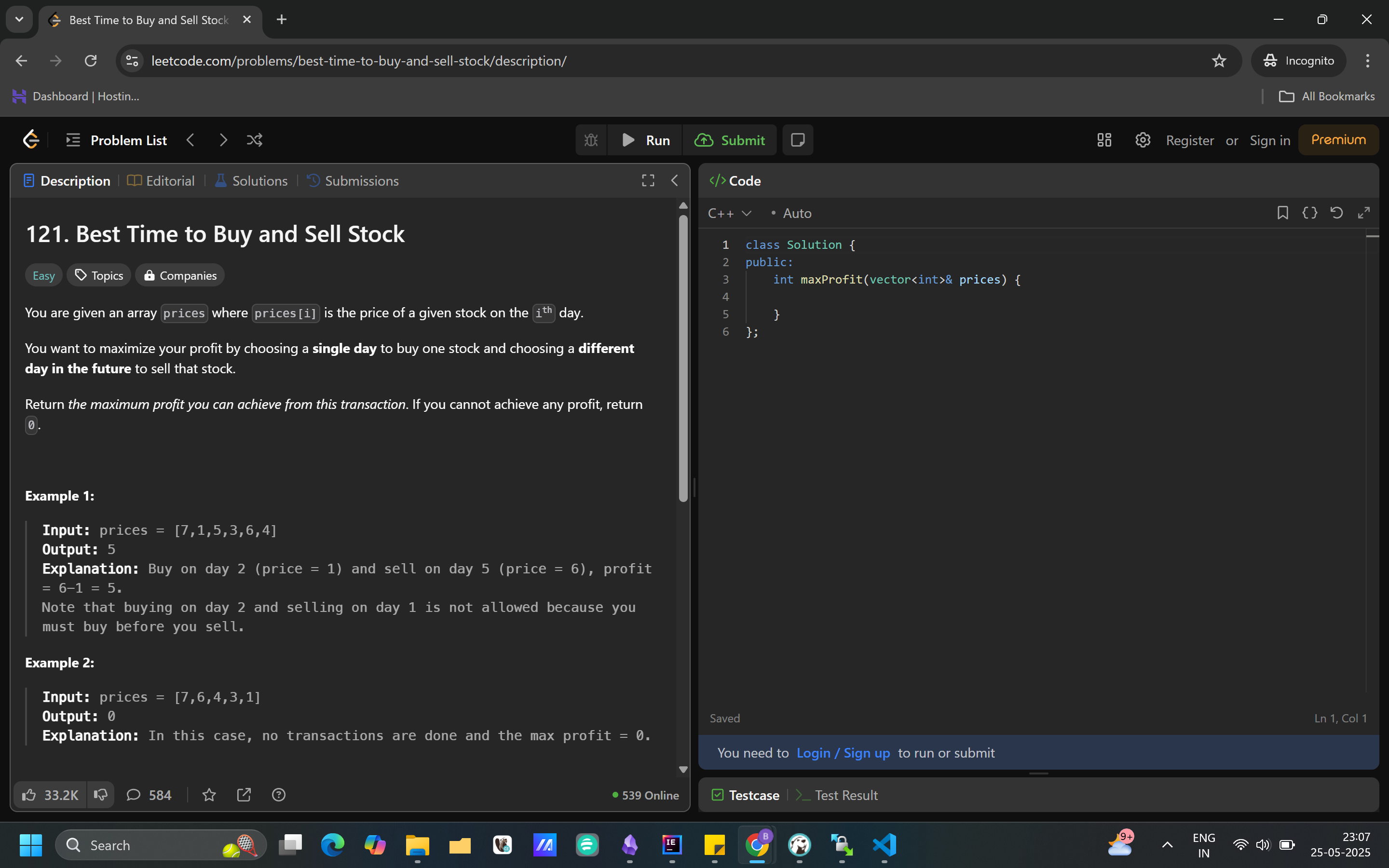
What They See
Their Screen

Absolutely nothing โ€” the browser is completely invisible on their end

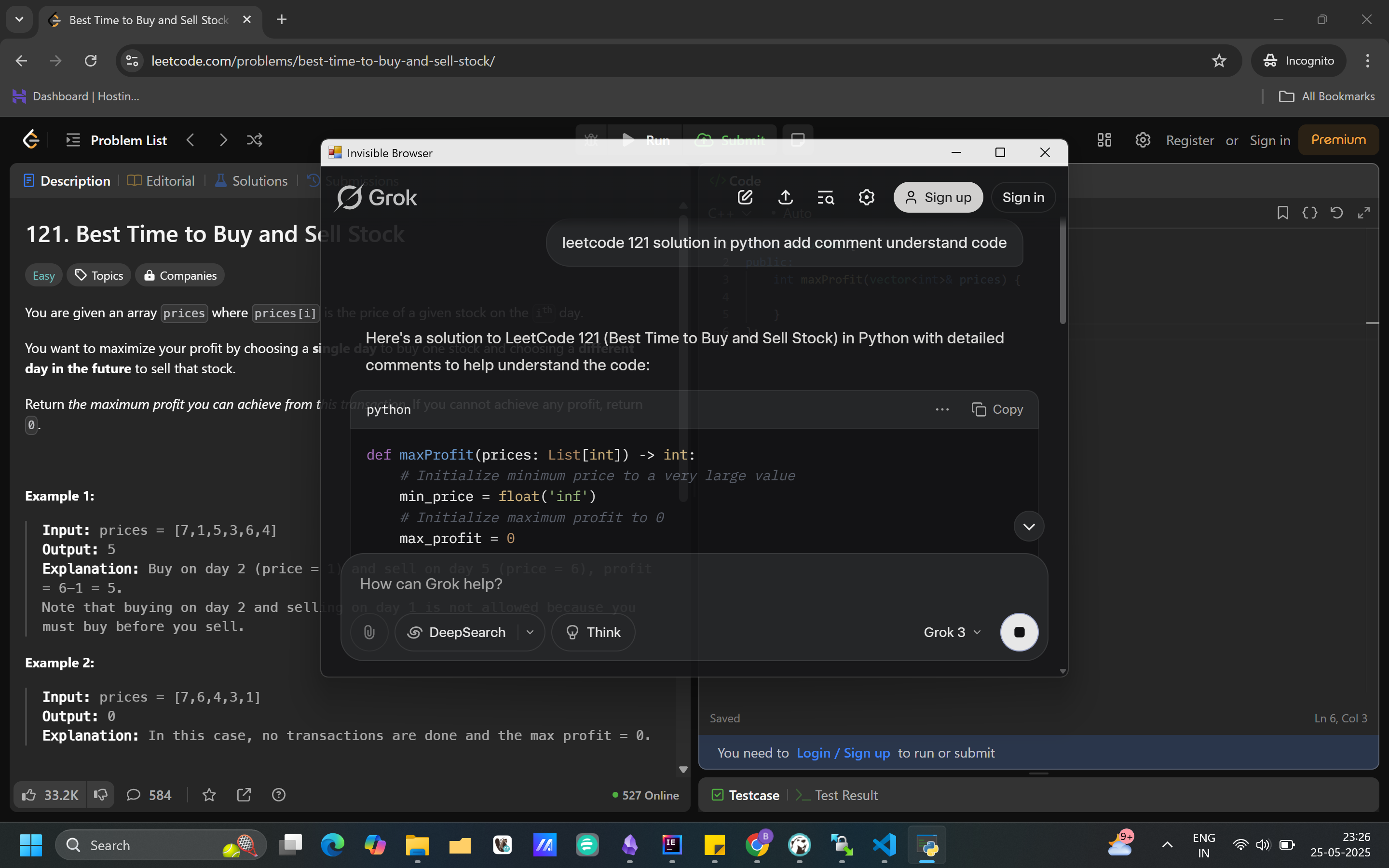
AI at Your Fingertips
AI Access

Load any AI model through Google โ€” ChatGPT, Claude, Gemini, all of them

Their View
Their Screen

Still nothing โ€” full AI power in your hands, zero trace on theirs

Built to Be Completely Undetectable

Every feature is engineered so you can focus on the interview โ€” not on getting caught.

Invisible on Taskbar

Never appears in the Windows taskbar. No icon, no trace, no evidence it's running.

Hidden During Screen Share

Share your entire screen confidently. The browser is completely invisible to interviewers on any platform.

Full AI Access

Open ChatGPT, Gemini, Claude, or any AI model via Google โ€” in real time, mid-interview.

Hidden in Task Manager

Not visible in Windows Task Manager or the running processes list. Zero system footprint.

Any Language, Any Round

Coding in Java, Python, C++? HR round? System design? It handles every interview type.

No Installation Required

Just download the .exe and run โ€” no setup, no admin permissions, no configuration needed.

Works on Every Major Interview Platform

Tested and confirmed undetectable. Use it with confidence on these platforms.

01 Zoom Zoom Undetectable
02 Leetcode Leetcode Undetectable
03 Microsoft Teams Microsoft Teams Undetectable
04 Google Meet Google Meet Undetectable

Simple, Transparent Pricing

Pick the plan that fits your interview schedule. Cancel anytime.

Starter

Perfect for a single interview

โ‚น149 / 2 days
โœ“2 days full access
โœ“Invisible browser
โœ“All interview types
โœ“Customer support
Get Started โ†’

Pro Yearly

Best value โ€” save over 60%

โ‚น2999 / year
โ‚น7999 billed annually
โœ“Unlimited yearly access
โœ“Invisible browser
โœ“All interview types
โœ“Priority support
Subscribe โ†’

Before You Subscribe

Download for free and test it on your system first โ€” subscribe only when you're satisfied.

Quick Verification Steps

1

Download the free Application

Grab the free .exe from our website. No payment needed to test.

2

Launch the Application

Windows may show a SmartScreen warning on first launch โ€” click "More info" then "Run anyway". The app is completely safe. Log in or create an account at nomorerejection.com.

3

Share your screen on Google Meet

Start a call, join from a second device, and share your full screen. Check whether the app shows up on the other device.

4

Check & Subscribe

If it's not visible on the second device โ€” you're ready to subscribe!

If it shows up, restart your system and try again. Works 99% of the time after a restart.

99% of cases it's not visible

Keyboard Shortcuts

Control the browser instantly โ€” no mouse movement, no suspicion.

Alt+H
Hide window
Alt+B
Bring window back
Alt+G
Go to Google homepage
Alt+D
Reduce opacity
Alt+F
Increase opacity
Alt+A
Change cursor style
Ctrl+Q
Exit application
Ctrl+N
Increase window size
Ctrl+M
Decrease window size
Ctrl+โ†
Move window left
Ctrl+โ†’
Move window right
Ctrl+โ†‘
Move window up
Ctrl+โ†“
Move window down

Pro Tips for Best Results

Small things that make a big difference when you're live in an interview.

Set your cursor to arrow only

In Windows cursor settings, change all cursor types โ€” link, text, busy, and others โ€” to the default arrow cursor. This prevents cursor changes from revealing the invisible window's position while screen sharing.

Grant mic permission before you start

Want to use voice search with ChatGPT or Claude? Open the app before your interview and allow microphone permission inside it. You need to do this every session โ€” do it before the interviewer joins.

Practice 5โ€“10 minutes before any live interview

Before your real interview, spend 5โ€“10 minutes doing a mock run on the tool. Get comfortable switching windows, typing queries to the AI, and reading responses โ€” so when it counts, everything feels natural and fast.

Try the audio feature with AI before going live

Test the voice/audio input feature with your AI tool of choice during practice โ€” not during a real interview. Make sure responses are clear, the mic picks up your voice well, and you know how to stop and start recording smoothly.

๐ŸŽ

Refer a Friend. Get 1 Week Free.

Share your referral code โ€” when your friend subscribes for the first time, you get 1 week free access automatically.

Your referral code

Click the code to copy it to clipboard

* Free access is granted only after your referred friend completes their first subscription.

NEW  ยท  100% Free

๐Ÿš€ DSA Animator is now live โ€” and it's FREE for everyone!

Learn Data Structures & Algorithms visually with smooth animations, step-by-step execution, clean UI, and easy-to-understand explanations.
Perfect for students, interview prep, and anyone who wants to truly see how DSA works.

โœ… Interactive visualizations
โœ… Clear concept breakdowns
โœ… Beginner-friendly experience
โœ… 100% Free for all

Covers topics like

Sorting Algorithms Binary Search Linked Lists Trees & Graphs Stacks & Queues BFS / DFS Dynamic Programming
Try DSA Animator โ€” It's Free  โ†’

No signup required  ยท  Works in your browser

๐Ÿ“ต Beat Mobile Addiction
Free Android App

LockIn โ€“ Take Back Control of Your Life

Spending too much time on your phone? LockIn breaks the cycle with a system built on real accountability โ€” not just willpower.

Here's how it locks you in
โฑ๏ธ
Select Duration
How long to lock
โ†’
๐Ÿ’ฐ
Choose Amount
Your penalty if you quit
โ†’
๐Ÿ”’
Lock & Focus
Distracting apps blocked
โ†’
๐Ÿ’ณ
Want to Unlock Early?
Pay the penalty first
๐Ÿ’ก Because money is involved โ€” you'll give it 100% every single time.
๐Ÿ“ต Blocks addictive apps ๐Ÿ” Lock survives reboot ๐Ÿ“ˆ Streaks & progress tracking ๐Ÿ“ž Calls & SMS always work ๐Ÿ† Build real discipline
Download LockIn โ€” Free

Free to download  ยท  Android  ยท  No subscription

Frequently Asked Questions

Everything you need to know before getting started.

Which type of interview can I give?

โ†“

You can give any type โ€” coding rounds, technical interviews, HR interviews, system design, and more. It works seamlessly on Zoom, Google Meet, Microsoft Teams, and other platforms.

How is it undetectable?

โ†“

The app works at the OS level. It's not visible in the taskbar, task manager, or running apps list, and it doesn't appear when you share your entire screen. It's engineered specifically to be undetectable by common interview platforms.

Can I get the approach or solution to a coding problem?

โ†“

Yes. You can open ChatGPT, Claude, Gemini, or any AI tool inside the invisible browser, ask for the approach, and even cross-question the AI for a better explanation โ€” all while in your live interview.

Can I use this for actual job interviews?

โ†“

Yes. The app is designed for real, live job interviews. It's undetectable and works with all major platforms. Use it for coding rounds, technical rounds, and HR rounds alike.

Will it be visible when I switch tabs?

โ†“

No. The application is completely invisible โ€” while switching tabs, sharing your full screen, in task manager, and in the taskbar. It runs silently in the background at all times.

It's not working on my system โ€” what do I do?

โ†“

First, restart your system and try again โ€” this resolves the issue 99% of the time. If it still doesn't work, contact our support team at help@nomorerejection.com.

Have more questions?  Mail us โ†’

Hello, Username
Current Subscription
Loading...
Promo Code
From the makers of NMR
๐Ÿš€ DSA Animator โ€” Free!
Learn DSA visually with smooth animations & step-by-step execution. Perfect for interview prep.
Try it Free โ†’
๐Ÿ“ต Beat Mobile Addiction
LockIn โ€“ Take Back Your Life
Lock โ†’ Choose penalty โ†’ Stay focused.
Unlock early? Pay first. Money = 100% focus.
Play Store
Logo
Invisible Browser Platform

Refund Policy

We are committed to providing a high-quality, undetectable interview browser experience. Our product is designed to be invisible on the taskbar, running tab, and even when sharing your entire screen or using task manager.

  • Refunds are only considered in cases of genuine technical failure where the Invisible Browser does not function as described and our support team is unable to resolve the issue.
  • Refund requests must be made within 3 days of purchase, with a clear description of the problem and supporting evidence.
  • No refunds for change of mind, unsupported platforms, or failure to use the product as intended.
  • We encourage you to test the free version before purchasing to ensure compatibility.
  • For refund requests, contact us at help@nomorerejection.com.

By purchasing, you agree that the Invisible Browser is intended for legitimate interview preparation and assistance only.

Terms & Conditions

By using No More Rejection, you agree to abide by all applicable laws and regulations. The Invisible Browser is intended solely for legitimate interview preparation and assistance.

  • The software is provided "as is" without warranty of any kind.
  • Users are responsible for ensuring their use complies with the policies of any interview or assessment platform.
  • We reserve the right to modify or discontinue the service at any time without notice.
  • All content, branding, and intellectual property remain the property of their respective owners.
  • Misuse may result in suspension or termination of your access without refund.

For questions, contact us at help@nomorerejection.com.

Privacy Policy

No More Rejection values your privacy. We collect only the minimum information necessary โ€” your email address and subscription details. We do not sell or share your personal data with third parties except as required by law or to process payments.

  • All user data is stored securely and used solely for account management and service improvement.
  • We use third-party payment processors (such as Razorpay) to handle transactions; your payment information is never stored on our servers.
  • We may use anonymized usage data to improve product features.
  • You may contact us at any time to request deletion of your account and associated data.

For privacy inquiries, email help@nomorerejection.com.